AUDIO VISUAL DISTRIBUTION, AGENCY and BRAND REPRESENTATION
across AUSTRALIA and NEW ZEALAND
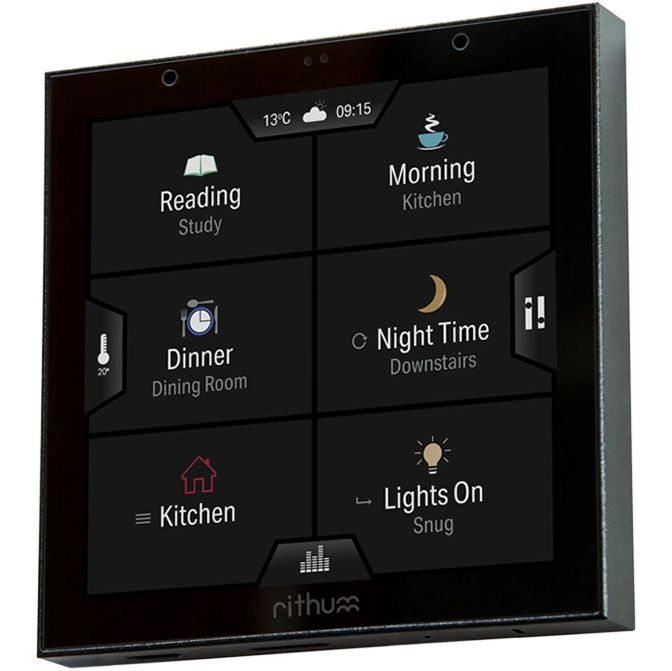
Rithum Switch is a smart home control panel that combines your lighting, audio and climate control into one simple touchscreen smart switch. The whole family can easily get the perfect lighting, sound and temperature setting without a phone, app or training.
Out-of-the-box Rithum Switch offers Philips Hue smart lighting and Sonos audio control. Plus, with temperature sensing built in, Rithum Switch includes Rithum Stat climate control and comes with the new Rithum Stat Scheduling screen.
Software plugins also allow the Rithum Switch to integrate with Fibaro, Rako, HDANYWHERE, BluOS, Tado, Homey and Lutron Ra2 systems.
Simply add the software plugin of your choice to the Cart and we will email you the link to download it.
Features:
The all-in-one smart home system
Using its built-in temperature sensor, the Rithum Switch can operate as a thermostat and offers a full range of climate control functions. We call this Rithum Stat*.
Rithum Stat also includes a Scheduling screen allowing users to set a seven day schedule with up to eight time points in each day.
Also included is audio control with Sonos smart speaker connectivity and smart lighting scenes with the Philips Hue integration. Full smart home control from one device!
*Requires a relay connected via a lighting integration
The Rithum Switch offers control of up to 8 Scenes with Philips Hue connectivity included as standard. Setup is easy, simply connect the switch via WiFi to the Hue Bridge and your Scenes will automatically display on your Rithum Switch.
Alternatively, please view the plugin integrations range for connectivity with lighting systems such as Homey, Rako or Lutron.
Rithum Switch has 8 main Scene buttons, but being able to collate sub-scenes in a group provides users with much wider control options. For example, a user could group 3 or 4 – or more – kitchen Scenes to one of the main 8 buttons.
From within Rithum Switch, users are able to control the lighting levels at Group Level, for example all lights in the Kitchen Group, or at individual device level. Simply use the toggles to switch groups or devices on or off, then use the sliders to adjust the levels as required.
Combining the Rithum Switch with the Table Stand allows the switch to be placed anywhere in a room, on a bedside table, a kitchen work top, or beside the sofa.
Specifications
| Input rating: | 100 - 240V~AC 50/60Hz / 12-30VDC |
| Wiring: | Parallel (neutral required) |
| Input current max: | 260mA |
| Power consumption standby: | 0.7W |
| Wi-Fi: | 2.4GHz 802.11bgn (Wi-Fi 4) |
| Environment: | For indoor use only |
| Back box: | Single gang EU 68mm Round or UK 71mm Square |
| Back box depth: | 35mm (25mm in some scenarios) |
Using its built-in temperature sensor, the Rithum Switch can operate as a thermostat and offers a full range of climate control functions. We call this Rithum Stat*.
Rithum Stat also includes a Scheduling screen allowing users to set a seven day schedule with up to eight time points in each day.
Also included is audio control with Sonos smart speaker connectivity and smart lighting scenes with the Philips Hue integration. Full smart home control from one device!
*Requires a relay connected via a lighting integration
The Rithum Switch offers control of up to 8 Scenes with Philips Hue connectivity included as standard. Setup is easy, simply connect the switch via WiFi to the Hue Bridge and your Scenes will automatically display on your Rithum Switch.
Alternatively, please view the plugin integrations range for connectivity with lighting systems such as Homey, Rako or Lutron.
Rithum Switch has 8 main Scene buttons, but being able to collate sub-scenes in a group provides users with much wider control options. For example, a user could group 3 or 4 – or more – kitchen Scenes to one of the main 8 buttons.
From within Rithum Switch, users are able to control the lighting levels at Group Level, for example all lights in the Kitchen Group, or at individual device level. Simply use the toggles to switch groups or devices on or off, then use the sliders to adjust the levels as required.
AUDIO VISUAL DISTRIBUTION, AGENCY and BRAND REPRESENTATION
across AUSTRALIA and NEW ZEALAND